
File Manager
The file manager works with game server files right from the panel: viewing and editing, uploading and downloading, archives, checksums, permissions. It lives on the Files tab of the game server page.
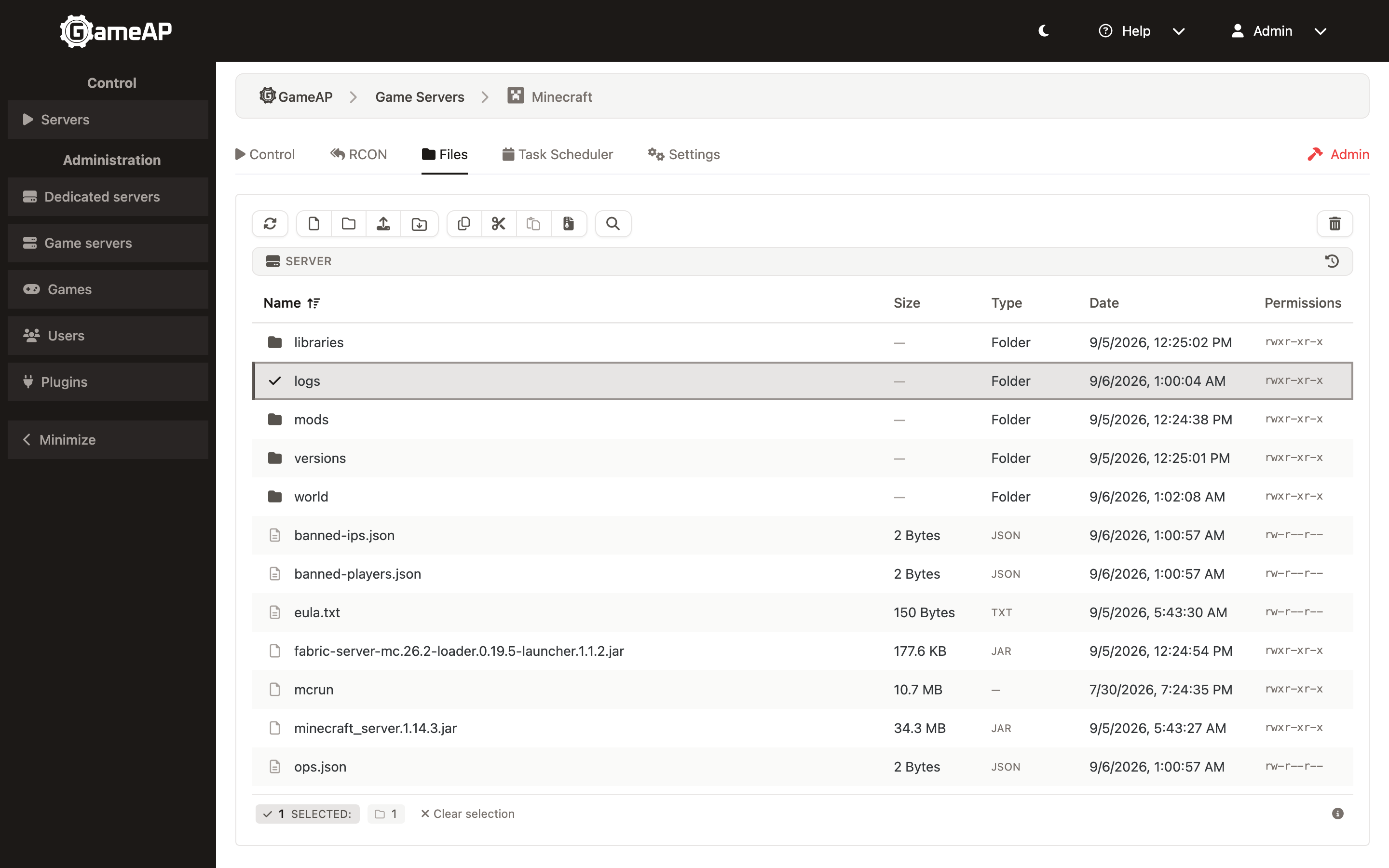
All operations are performed through GameAP Daemon on the dedicated server and are confined to the game server directory — there is no way to escape it.
Access requires the game-server-files permission on the server, see
Users, Roles, and Permissions.
Uploading Files
The file manager always uploads through a resumable chunked session, whatever the file size.
The file is split into chunks of FILES_UPLOAD_CHUNK_SIZE (8 MB by default); chunks are sent
in parallel, four at a time, with three attempts each.
The maximum file size is the chunk size multiplied by FILES_UPLOAD_MAX_CHUNKS (100,000 by
default), which is about 780 GB.
The API also has a single-request endpoint, POST /api/file-manager/{server}/upload, with a
fixed limit of 100 MB. The panel interface does not use it.
Resuming
Before sending, the browser computes the SHA-256 checksum of the whole file and passes it to the panel along with the upload parameters. The panel tracks which chunks have been received.
If the upload is interrupted — the tab closed, the network dropped — on retry the panel reports the list of missing chunks, and only those are sent. The whole file does not have to be sent again.
Unfinished uploads live for FILES_UPLOAD_SESSION_TTL (24 hours by default), after which they
are removed by a background cleanup that runs every FILES_UPLOAD_JANITOR_INTERVAL (12 hours
by default).
The checksum is computed in the browser via WebAssembly. If you have edited the CSP policy and removed
'wasm-unsafe-eval'fromscript-src, file uploads will stop working. See Security.
Uploading Directories
Besides individual files, a whole directory can be uploaded — the nested subdirectory structure is preserved.
Which Files Are Allowed
The file type is detected from the content, not from the extension and not from what the browser reports. Allowed by default:
- images: PNG, JPEG, GIF, WebP, BMP, ICO;
- text files, including configuration files — they are detected as
text/plain; - JSON, XML, CSV, YAML;
- PDF.
SVG and HTML are not allowed by default: a script can be hidden in them.
The allowed types are controlled by variables, see Configuration:
| Variable | Purpose |
|---|---|
FILES_UPLOAD_ALLOW_ARCHIVES |
Allow archives to be uploaded: zip, tar, gzip, bzip2, 7z, xz |
FILES_UPLOAD_ALLOW_BINARY |
Allow arbitrary binary files (application/octet-stream) to be uploaded |
FILES_UPLOAD_ALLOWED_MIMES |
Additional allowed types; extends the default list rather than replacing it |
Downloading
A single file is downloaded as is. A single directory is packed into a ZIP and streamed in one pass, without creating a temporary archive on disk; the files are stored without compression. Downloading is not offered for a multi-selection — to take several items at once, create an archive with Zip and download the resulting file.
The total size and file count are sent in the X-Archive-Total-Bytes and
X-Archive-Total-Files headers before the body begins, so the panel shows a determinate
progress bar. Symlinks are preserved as symlink entries; special files (sockets, FIFOs,
devices) are skipped and listed in a _SKIPPED.txt entry at the end of the archive.
Archives
Archives are created and unpacked on the dedicated server: the panel only starts the operation and shows its progress.
Creating
Select one or more files and folders and pick Zip from the context menu. The
Create archive dialog asks for a name and a Format: zip, tar, tar.gz, tar.bz2, tar.xz or
tar.zst. The format is also inferred from the extension of the name (.tgz, .tbz2, .txz
and .tzst are recognised too). Through the API a single file can additionally be compressed
as standalone gz, bz2, xz or zst.
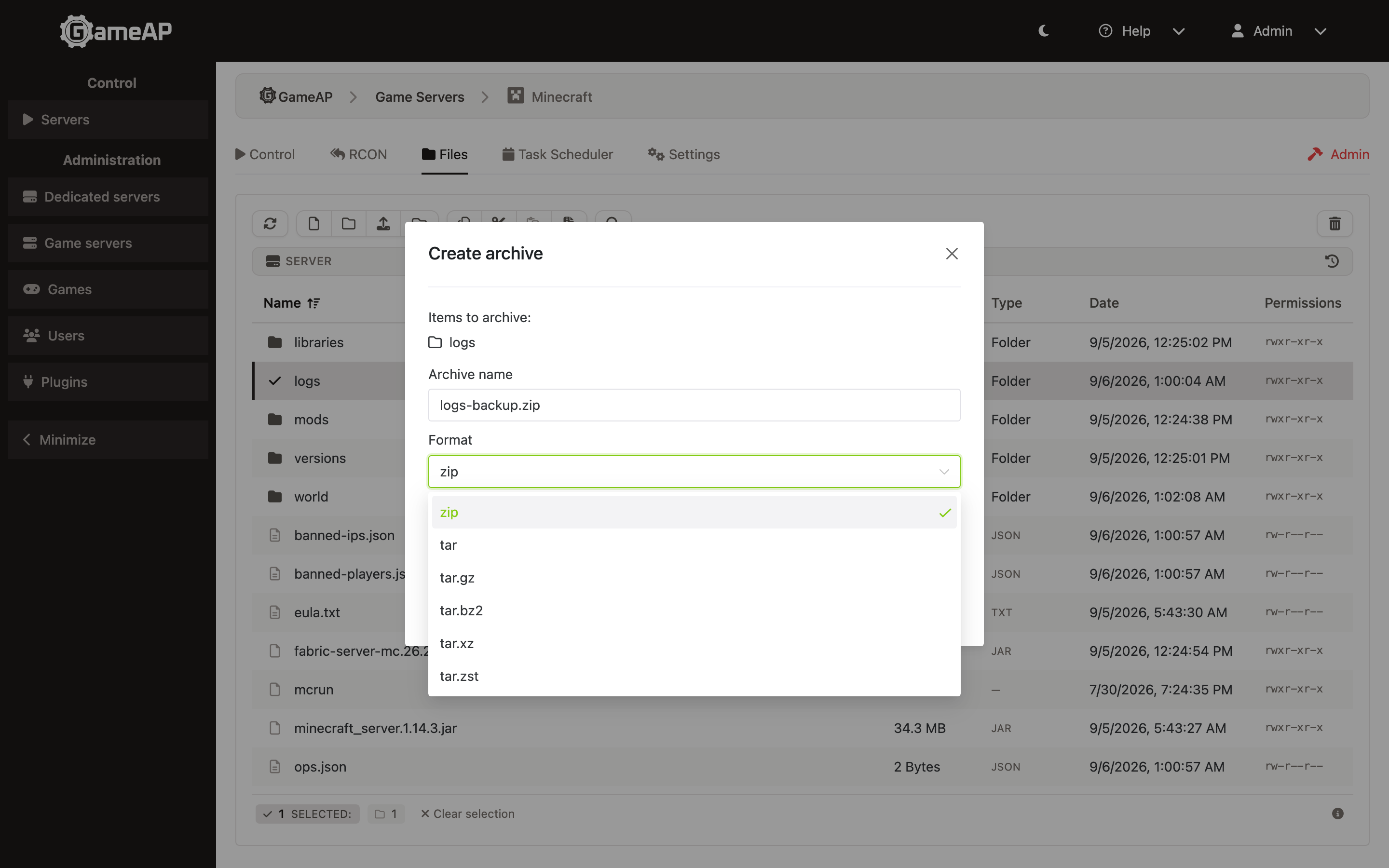
If a file with that name already exists, the dialog does not proceed until you tick Overwrite existing archive.
Advanced options reveal the Compression level, 0–9. Leave it empty for the format’s
default. 0 means store without compression for zip and gzip; bzip2 and zstd cannot store, so
0 becomes their fastest level; xz has no levels and ignores the value.
Unpacking
Select a single archive and pick Unzip from the context menu. The action appears for files
with these extensions: .zip, .tar, .tar.gz/.tgz, .tar.bz2/.tbz2, .tar.xz/.txz,
.tar.zst, .gz, .bz2, .xz, .zst, .7z, .rar. 7z and rar are extraction-only.
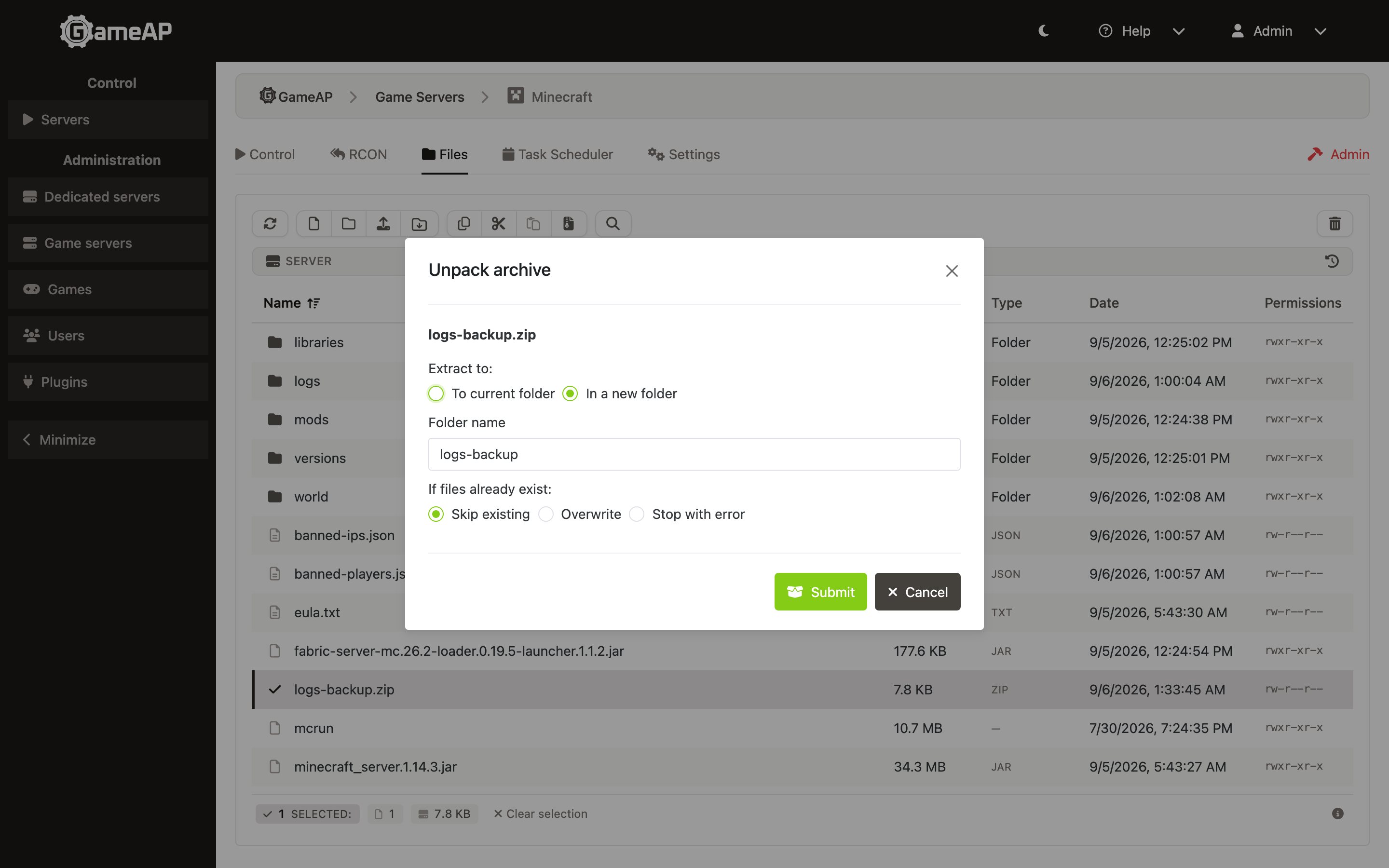
The Unpack archive dialog has two settings:
- Extract to: — In a new folder (default; the folder is named after the archive without its extension) or To current folder.
- If files already exist: — Skip existing (default), Overwrite or Stop with error. Choosing Overwrite shows a warning that matching names will be overwritten.
Permissions stored in the archive are restored. Password-protected archives are not supported:
the operation fails with archive is encrypted, password required.
Progress and Cancellation
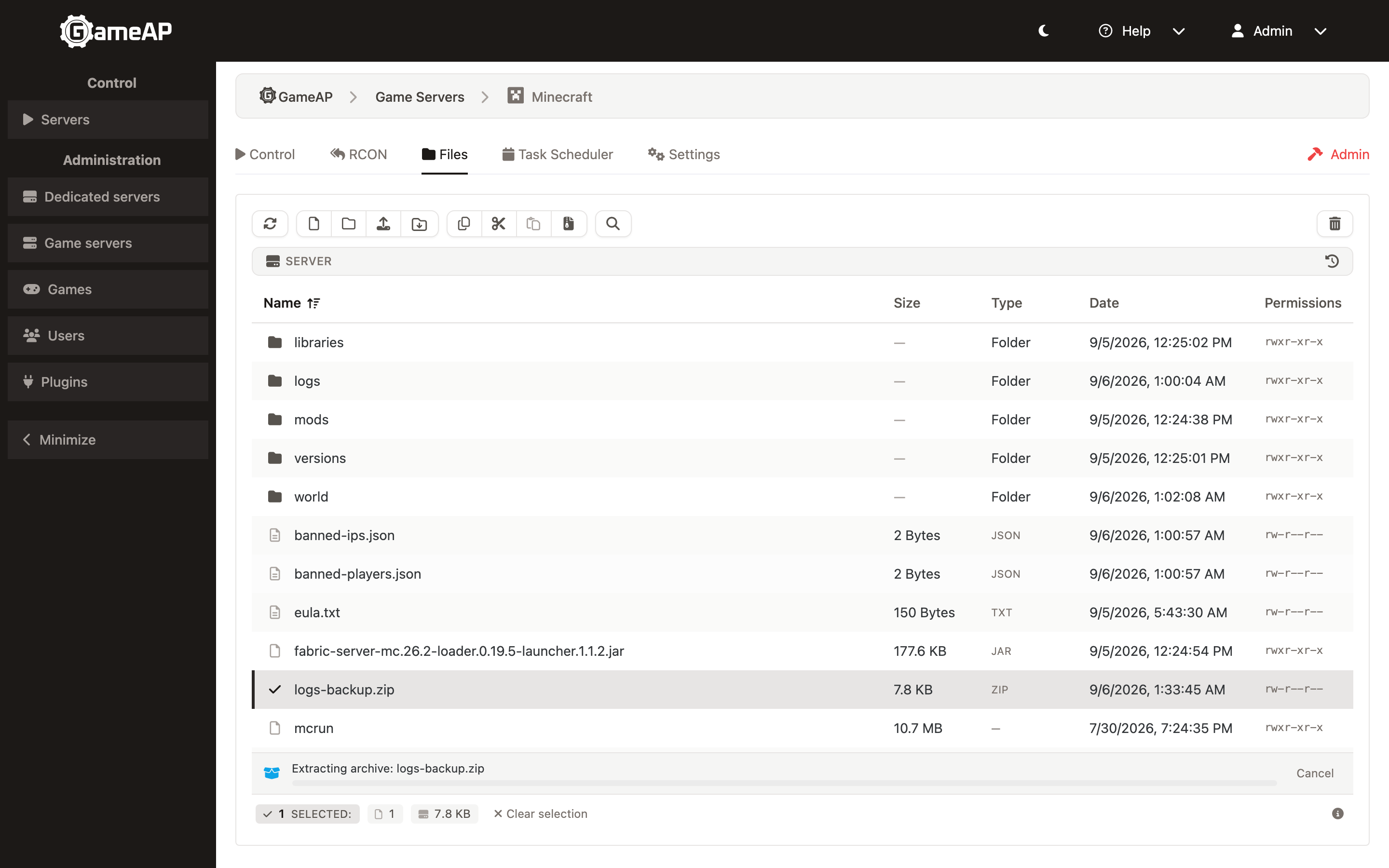
Each running operation is shown as a progress bar with a Cancel button; progress is delivered over WebSocket. Creation and extraction are subject to the size and file-count limits, see Limits.
Archive operations require GameAP Daemon 4.1.0 or newer. The daemon announces an
archivecapability when it connects; if the node’s daemon does not have it, the panel answers502 node does not support archive operations. Checksums need the same daemon version, but are not capability-gated: with an older daemon the request simply fails.
Checksums
Right-click a single file and pick Checksums. The File checksums dialog computes SHA-256, SHA-1, SHA-512, MD5, CRC32 (IEEE) and CRC64 (ECMA-182) on the dedicated server.
For files up to 1 MB, SHA-256 and MD5 are computed as soon as the dialog opens; for larger files only SHA-256. The remaining algorithms are computed on demand with the Compute button. Click a value to copy it to the clipboard.
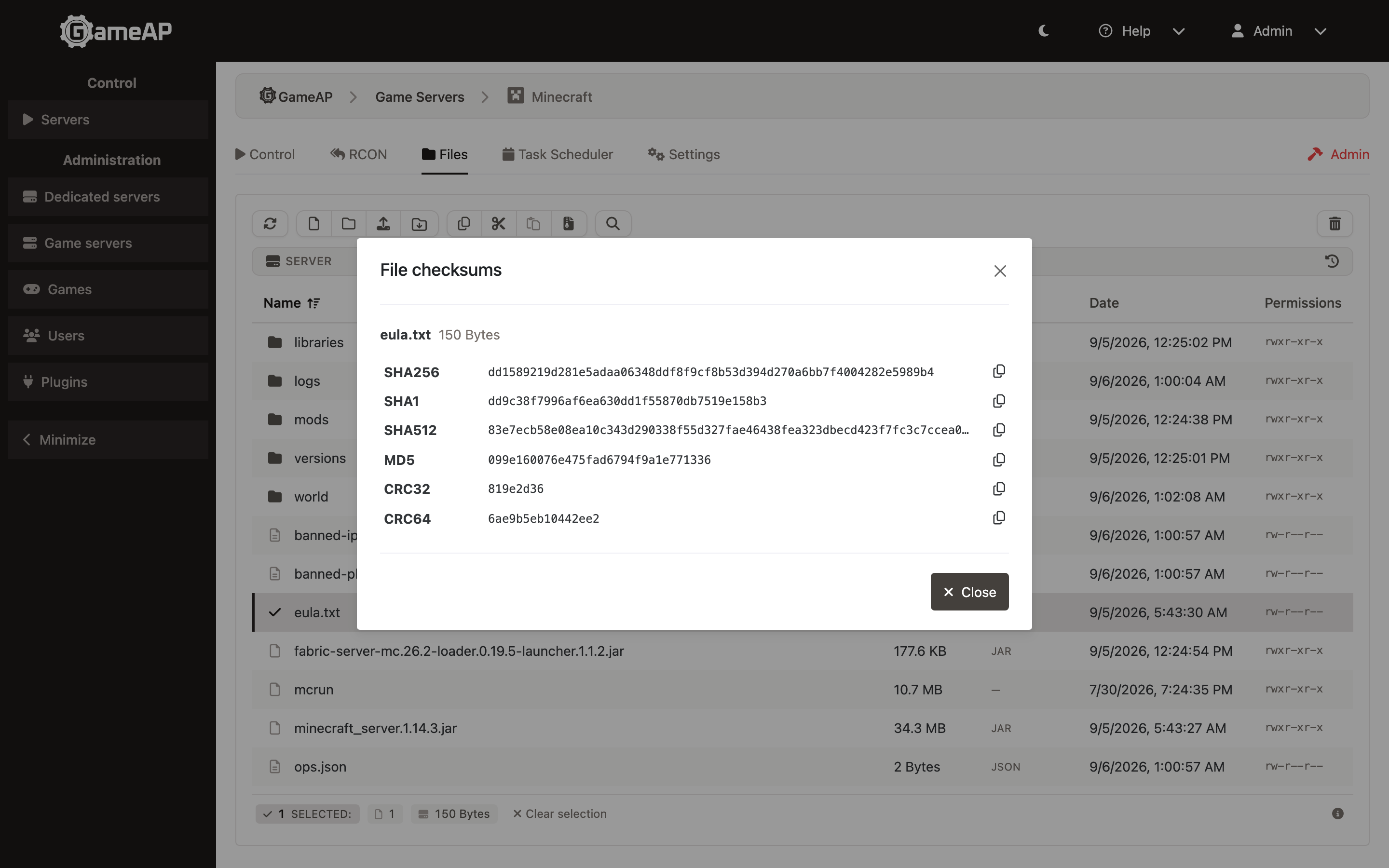
The API endpoint accepts up to 100 paths in one request and reports an error per file for paths it could not hash.
Search
Click the magnifier in the toolbar or press Ctrl+F (Cmd+F on macOS). Typing three characters in quick succession outside a text field also opens the search, pre-filled with them.
Search does not filter the list: it highlights matching names and jumps between them. Enter or ↓ goes to the next match, Shift+Enter or ↑ to the previous one, Esc closes the search.
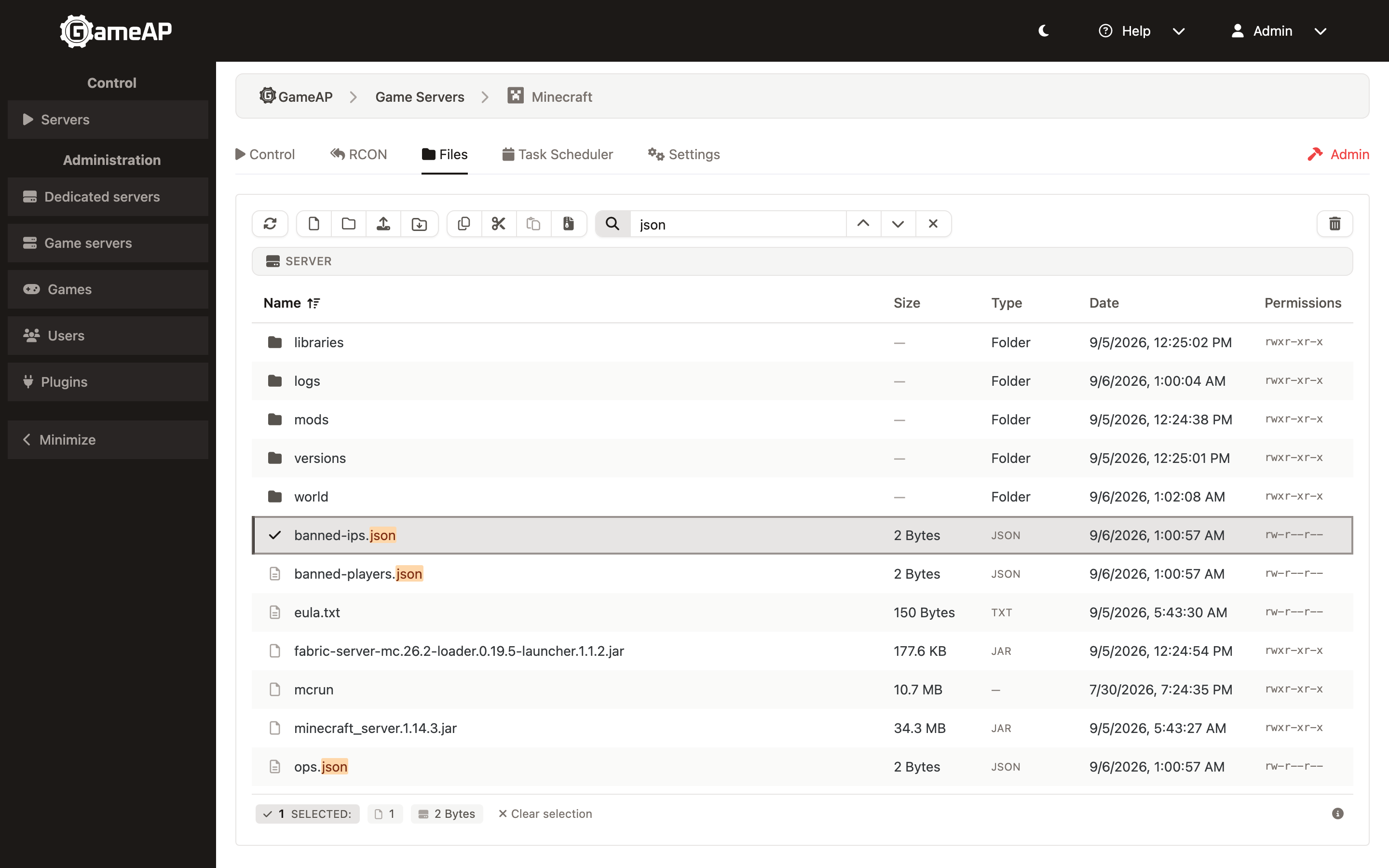
Only names in the current folder are searched — folders first, then files. Search is not
recursive and does not look inside files. Matching ignores case and diacritics (e finds
é, c finds ć) and does not depend on the keyboard layout: if the text as typed finds
nothing, it is re-read as if typed on the other supported layouts — English, Russian, German,
Spanish.
History
The History button (clock icon) in the path bar shows the folders and files you work with most, on two tabs: Recent and Frequent. Each tab lists up to four folders and four files. The button appears once there is something to show.
- Recent — items from the last 30 days, newest first.
- Frequent — ranked by a score that grows by one on every visit and halves every 7 days, so old favourites gradually give way to new ones.
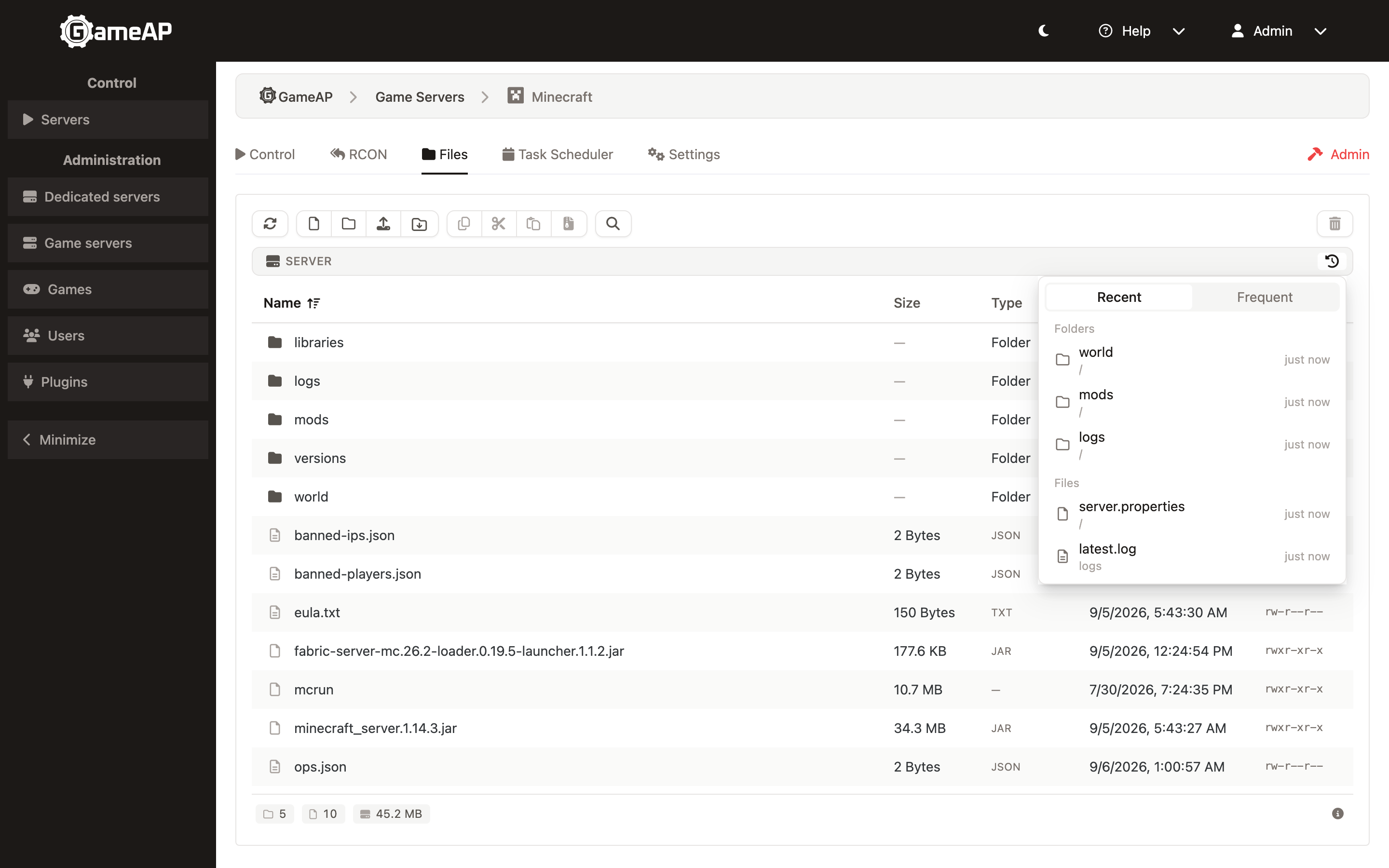
A folder is recorded after about 5 seconds spent in it, or immediately when a file is opened from it — folders you only pass through are not recorded, and the root is never recorded. Deleted items disappear from history, renamed ones are moved. Clicking an entry that no longer exists removes it.
History is kept only in the browser, in localStorage under the key
gameap:fm:history:{server}:{disk}. It is never sent to the panel and is not shared between
users, browsers or devices. Up to 200 folders and 200 files are remembered for each server
and disk.
Limits
| Variable | Default | Purpose |
|---|---|---|
FILES_ARCHIVE_MAX_BYTES |
100G |
Maximum uncompressed size of one operation: the ZIP download, archive creation and extraction on the dedicated server. On extraction this is the protection against decompression bombs |
FILES_ARCHIVE_MAX_FILES |
500000 |
Maximum number of entries, in the same three cases |
FILES_ARCHIVE_CONCURRENT_PER_SERVER |
2 |
Concurrent ZIP downloads for one game server; exceeding it gives HTTP 429. Does not limit archive creation and extraction |
If a limit is set to 0, the daemon applies its own defaults: 10 GiB and 100,000 entries.
Upload limits are described in Uploading Files; all variables are listed in Configuration.
File Permissions
File and directory permissions can be changed with chmod — just like in a shell. This is needed, for example, to make a game server startup script executable.
Editing
Text files open in the built-in editor. Plugins can add their own editors for particular
files — for example, a hex editor for binaries. Files larger than 1 MB are not opened by plugin
editors, except editors that load the file themselves (declared with contentType: 'none') —
those stay available at any size. See Plugins.
Audit
Archive operations are recorded in the audit log: file.archive.create (operation id, format,
number of sources), file.archive.extract (operation id, conflict policy) and
file.archive.cancel (operation id). Uploads rejected by the type check are recorded as
file.upload with the file name, the detected type and the reason mime_not_allowed.
Chunked uploads and checksum requests do not produce audit records.
If Something Goes Wrong
| Symptom | Cause |
|---|---|
| Upload fails with Rejected by proxy (request too large) — HTTP 413 | The reverse proxy rejected a chunk. Raise client_max_body_size in nginx above FILES_UPLOAD_CHUNK_SIZE |
| Upload fails with Session expired, retry — HTTP 410 or 404 | The upload session has expired (FILES_UPLOAD_SESSION_TTL). Start the upload again |
| Upload fails with Checksum mismatch — HTTP 422 | The file changed on disk while it was being uploaded. Start the upload again |
| The upload breaks off at checksum computation | 'wasm-unsafe-eval' has been removed from the CSP policy |
| The upload does not start | The game-server-files permission is missing, or the daemon is unreachable |
node does not support archive operations — HTTP 502 |
GameAP Daemon on the node is older than 4.1.0 |
| ZIP download fails with HTTP 429 | Too many concurrent downloads for this game server (FILES_ARCHIVE_CONCURRENT_PER_SERVER). Wait for the running download to finish |
Unpacking fails with archive is encrypted, password required |
The archive is password-protected; such archives are not supported |
The details are visible in the panel log, see Troubleshooting.