
How GameAP Works
GameAP consists of two applications: the panel, which the administrator works with, and the daemon, which runs on every dedicated server and manages game servers.
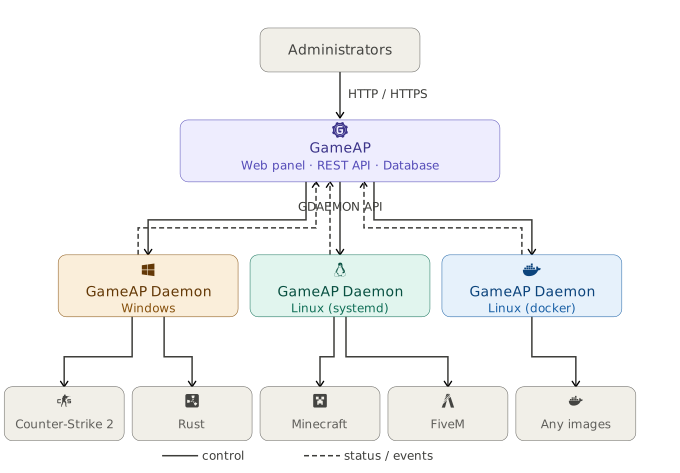
Three Layers
The panel is a single application with a built-in web interface. It stores all the data: users, dedicated servers, games, game servers, tasks. It does not start game servers itself and does not touch their files — it only issues commands to daemons.
GameAP Daemon runs on every dedicated server. It starts and stops game servers, monitors their state, installs and updates them, works with files, and collects metrics.
Game servers are processes the daemon manages through a process manager: systemd, Docker, Podman, tmux, and others.
The panel and the daemon can be installed on one server — then all three layers end up on the same machine.
Who Connects to Whom
The connection is always established by the daemon: it connects to the panel itself and keeps a single persistent connection that carries all the traffic.
The panel does not connect to the daemon. The dedicated server needs no open inbound ports and no external IP address — outbound access to the panel is enough.
This differs from GameAP 3, where the panel connected to the daemon.
| Direction | Default port | Protocol | Variable |
|---|---|---|---|
| Administrator’s browser → panel | 8025 |
HTTP | HTTP_PORT |
| Administrator’s browser → panel | 443 |
HTTPS | HTTPS_PORT |
| Daemon → panel | 31718 |
gRPC | GRPC_PORT |
| Panel → game server | game port | Query, RCON | — |
These are three separate listeners, not one port with protocol detection. HTTPS is started only when a certificate is configured, see HTTPS and Certificates.
The panel performs Query and RCON requests to game servers itself, directly — they do not go through the daemon.
What Happens When a Server Starts
- The administrator clicks a button in the panel.
- The panel creates a task and puts it in the database.
- The task goes to the daemon over the established connection.
- The daemon starts the game server through the process manager.
- The daemon sends the progress and the command output; the panel shows them in real time over WebSocket.
- From then on, the daemon regularly reports the server state and metrics.
If the connection to the panel is lost, game servers keep running — only control from the panel is unavailable. Once the connection is restored, the daemon reconnects and receives the complete current state from the panel.
What Is Stored Where
| Data | Where |
|---|---|
| Users, servers, games, tasks | Panel database |
| Plugin secrets | Panel database, encrypted with ENCRYPTION_KEY |
| gRPC certificates, ACME data | Panel file storage |
| Sessions, counters, setup key, SSO tickets | Panel cache |
| Panel configuration | config.env |
| Game server files | The dedicated server, in the daemon’s working directory |
| Daemon configuration | gameap-daemon.yaml on the dedicated server |
| Metrics | The daemon’s RAM, for no longer than an hour |
Game server files are not copied to the panel: the file manager works with them through the daemon.
Extending
Plugins run inside the panel in a WebAssembly sandbox. They add pages, tabs, and
integrations, but have no system access of their own: everything a plugin touches goes through
the host libraries the panel provides, and the privileged ones are opened only by the permissions
the administrator grants to each plugin. Among them is an SSH library that lets a plugin reach a
host directly, bypassing the daemon — it is disabled by default and enabled with
PLUGINS_SSH_ENABLED=true. See Plugins.
API — everything the interface does is available through the HTTP API; the interface itself works through it. See API and Tokens.
Next
- Requirements — what is needed for installation
- Getting Started — installing the panel and the first dedicated server
- GRPC API — details of the panel–daemon communication channel
- Multiple Panel Instances — a fault-tolerant setup