
GameAP Daemon
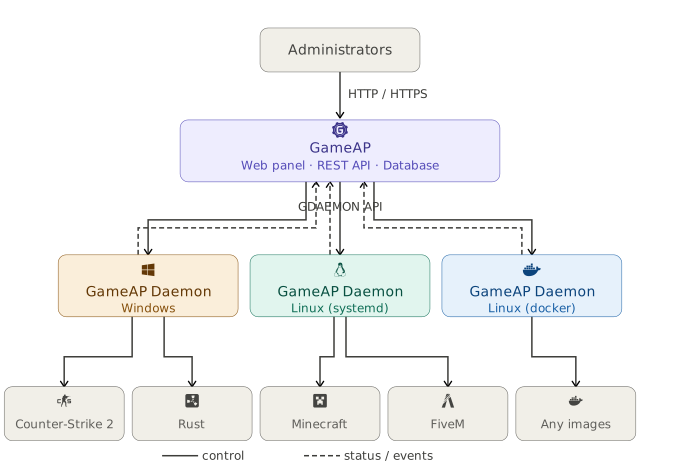
GameAP Daemon is a background application that runs on a dedicated server and manages game servers: it installs, removes, starts, and stops them, monitors their state, and executes commands from the panel.
The daemon itself connects to the panel over gRPC and keeps a persistent connection. The panel does not connect to the daemon, and the daemon opens no inbound ports on the dedicated server.
Installation
Automatically via the Panel
In the panel, go to Administration → Dedicated Servers → Create, copy the command, and run it on the dedicated server.
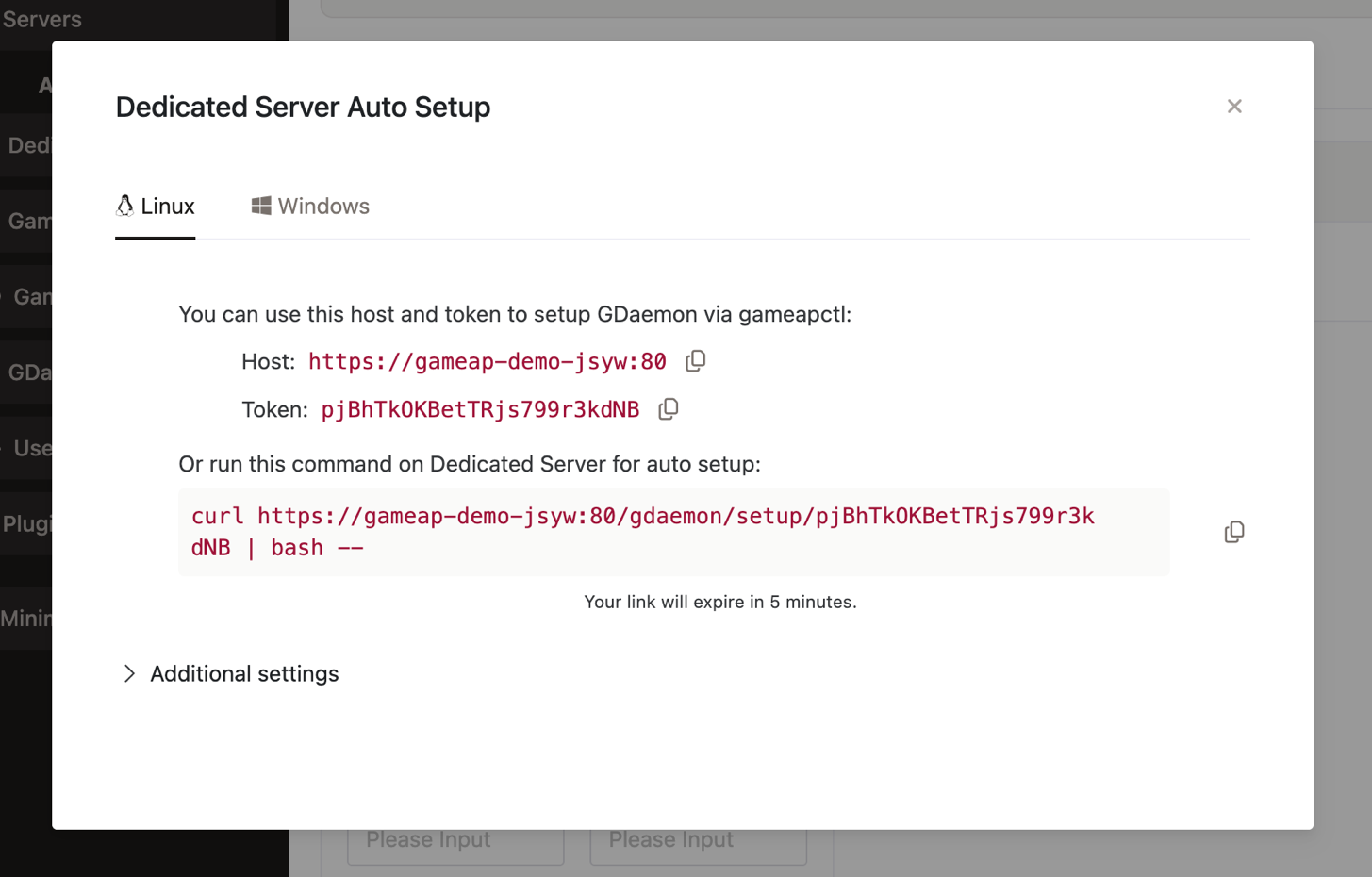
The full installation guide, including Windows, manual registration, and troubleshooting, is on the Dedicated Servers page.
Process Manager
A process manager is a system utility that starts, stops, and restarts game servers and monitors their state. It can be chosen during installation, in the Additional settings block.
If no manager is specified, the daemon picks one itself: on Linux — systemd, with a fallback
when systemd is unavailable or the daemon runs in a container; on Windows —
Shawl; on macOS — tmux.
See Process Managers for details.
Configuration
The configuration file is in YAML format:
- Linux —
/etc/gameap-daemon/gameap-daemon.yaml - Windows —
C:\gameap\daemon\gameap-daemon.yaml
The path can be set explicitly with the --config (-c) flag. Without the flag, the daemon
searches a list of paths: first the current directory, then /etc/gameap-daemon/,
/etc/gameap/, then /etc/gameap-daemon.yaml and the user’s home directory. The first file
found wins.
The search list still contains names with the
.cfgextension — a leftover from GameAP 3. Such a file will be found, but only YAML is parsed: the daemon will exit with an unsupported format error. Use.yamlor.yml.
Unknown keys in the file are ignored. Relative paths to certificate files are resolved against the directory the configuration file itself is in.
Required Parameters
| Parameter | Type | Description |
|---|---|---|
ds_id |
number | Dedicated server ID in the panel |
api_key |
string | Panel API access key |
grpc.address |
string | Panel address as host:port |
All three are filled in automatically when the daemon is registered.
If grpc.address is not set, the address is derived from the legacy api_host parameter: the
host name is taken and the port is replaced with 31718. Setting grpc.address explicitly is
more reliable — api_host is kept for compatibility only.
Connecting to the Panel
| Parameter | Default | Description |
|---|---|---|
grpc.address |
— | Panel address host:port |
grpc.insecure |
false |
Disable TLS. Debugging only |
grpc.heartbeat_interval |
30s |
Heartbeat send interval |
grpc.connect_timeout |
30s |
Connection establishment timeout |
grpc.initial_reconnect_delay |
1s |
Initial delay before reconnecting |
grpc.max_reconnect_delay |
60s |
Maximum delay before reconnecting |
More on the protocol, reconnection, and mutual authentication — GRPC API.
Certificates
The connection to the panel is protected by TLS, and the daemon presents a client certificate. All three files are issued by the panel during registration.
| Parameter | Description |
|---|---|
ca_certificate_file |
Path to the panel’s certificate authority certificate |
certificate_chain_file |
Path to the daemon certificate |
private_key_file |
Path to the daemon private key |
private_key_password |
Private key password, if the key is encrypted |
ca_certificate |
CA certificate directly in the configuration file |
certificate_chain |
Daemon certificate directly in the configuration file |
private_key |
Private key directly in the configuration file |
For each of the three certificates, set either the file path or the content — the value in the
configuration file takes precedence. With grpc.insecure: true, no certificates are required.
Paths
| Parameter | Default | Description |
|---|---|---|
work_path |
— | Working directory. Game server files live in its subdirectories |
tools_path |
{work_path}/tools |
Directory for auxiliary tools |
steamcmd_path |
— | SteamCMD directory |
path_7zip |
— | Path to 7-Zip. Windows only |
path_starter |
— | Path to the starter program. Windows only |
Defaults set during installation: work_path — /srv/gameap on Linux and C:\gameap on
Windows, steamcmd_path — /srv/gameap/steamcmd and C:\gameap\steamcmd respectively.
Logging
| Parameter | Default | Description |
|---|---|---|
log_level |
info |
debug, info, warn, error |
output_log |
— | Log file for regular messages |
error_log |
— | Error log file |
After installation the log is written to /var/log/gameap-daemon/output.log on Linux and
C:\gameap\daemon\logs\output.log on Windows.
Metrics Collection
| Parameter | Default | Description |
|---|---|---|
metrics.enabled |
true |
Metrics collection |
metrics.collection_interval |
5s |
Sampling interval, no less than 1s |
metrics.retention_duration |
10m |
How long to keep samples. Allowed range 10m to 60m |
if_list |
— | Network interfaces to collect metrics for |
drives_list |
— | Drives to collect metrics for |
retention_duration values outside the allowed range are clamped to its bounds.
Task Execution
| Parameter | Default | Description |
|---|---|---|
task_manager.run_task_period |
10ms |
Task queue polling interval |
task_manager.task_timeout |
2h |
Maximum execution time of a single task |
task_manager.workers_count |
— | Number of tasks executed concurrently |
Process Manager
| Parameter | Default | Description |
|---|---|---|
process_manager.name |
detected automatically | Process manager name |
process_manager.config |
— | Additional manager parameters |
The contents of process_manager.config depend on the manager:
systemd—scope:system(default) oruser. With any other manager ascopekey keeps the daemon from starting:process_manager.config.scope is only valid for process_manager.name=systemd.docker— connection parametershost,cert_pathandapi_version. If none of them is set, the client is configured from the standard Docker environment variables (DOCKER_HOST,DOCKER_CERT_PATH,DOCKER_TLS_VERIFY,DOCKER_API_VERSION).podman—socket_path, the path to the Podman API socket.
process_manager:
  name: systemd
  config:
    scope: user
For docker and podman the same block also accepts container parameters (image,
workdir, dns and so on — with or without the docker_ prefix) as a default for the whole
node. Such a value is used only when the same key is not set in the server variables, the mod
metadata or the game metadata. Do not set container_name node-wide: it goes through the same
lookup, so every server on the node would get the same container name. The list of container keys
and examples are on the Process Managers page.
Steam Account
Many game servers cannot be downloaded via SteamCMD anonymously — an account with a purchased copy of the game is needed.
steam_config:
  login: your_login
  password: your_password
  group: gameap
The group parameter sets a shared group for the SteamCMD directory so that game servers
running under their own users can update SteamCMD. If not set, the primary group of the server’s
user is used.
Two-factor authentication must be disabled on the Steam account used — otherwise the daemon will not be able to log in to SteamCMD.
For that reason, create a separate account used only for downloading server files, not your main one: the password is stored in the configuration file in plain text, and an account with two-factor authentication switched off is noticeably more vulnerable.
The configuration file holds passwords and the panel access key. Keep it readable only by the user
the daemon runs as, and do not include it in unencrypted backups or in logs you send anywhere. On
registration the daemon creates the file with mode 0600 — preserve that when editing it by hand.
Repository Address Replacement
Lets you substitute the host game server files are downloaded from — for example, with a closer mirror.
remote_repository_replacements:
  files.gameap.ru: cdn.gameap.com
  files.gameap.com:
    - cdn1.gameap.com
    - replace: cdn2.gameap.com
      priority: 10
The first line covers the most common case: files.gameap.ru is a retired address, and game
entries created before it was switched off still point at it. This replacement fixes them without
editing every game.
The value can be a single address or a list. List items may specify a priority — the higher
the number, the higher the priority.
Windows Parameters
| Parameter | Default | Description |
|---|---|---|
use_network_service_user |
false |
Run game servers as NT AUTHORITY\NETWORK SERVICE |
users |
— | Passwords of the users game servers run under |
With use_network_service_user: true, servers run under a system account with limited
privileges — this is the default choice when installing via gameapctl. Otherwise, the accounts
from the users block are used:
users:
  gameap_user1: password
  gameap_user2: base64:cGFyb2xi
A password can be written base64-encoded with the base64: prefix.
base64:is encoding, not encryption. Such a value is turned back into the original password by a single command and protects nothing against someone reading the file. The prefix only exists for passwords with special characters that break YAML parsing. The only protection here is the file permissions.
Configuration File Example
ds_id: 1
api_key: your_key

grpc:
  address: panel.example.com:31718

ca_certificate_file: /etc/gameap-daemon/certs/ca.crt
certificate_chain_file: /etc/gameap-daemon/certs/server.crt
private_key_file: /etc/gameap-daemon/certs/server.key

work_path: /srv/gameap
steamcmd_path: /srv/gameap/steamcmd

if_list: []
drives_list: []

log_level: info
This is exactly the file the registration command creates. A complete example with all parameters and comments is available in the daemon repository.
Service Management
Daemon Version
gameap-daemon version
The command (short form gameap-daemon v) prints the daemon version, build date, OS and
architecture, and the Go version — include this output when reporting a problem.
The panel reports the same version on the Administration → Dedicated Servers page: the node
card shows the version, and the Overview tab of the details window shows it together with the
build date. Starting with panel 4.5.0 the version is compared with the latest stable GameAP Daemon
release, and an outdated daemon gets the New GameAP Daemon version available banner — see
Dedicated Servers. The check is
controlled by the UPDATE_CHECK_* variables — see the
config.env Reference.
Linux
systemctl start gameap-daemon
systemctl stop gameap-daemon
systemctl restart gameap-daemon
systemctl status gameap-daemon
Upgrading:
gameapctl daemon upgrade
Windows
The daemon runs as the GameAP Daemon service. It can be managed via gameapctl.exe or with
standard Windows tools.