
Users, Roles, and Permissions
Access in the panel is built from three concepts:
- Permission — a single allowed action, for example “start a game server”.
- Role — a named set of permissions. A role is assigned to a user.
- Direct permission — a permission granted to a user bypassing roles.
Permissions can be granted globally or tied to a specific object — most often a single game server. That is how a user is given access to their own server and nothing else.
Default roles
Two roles are created during the initial seeding of the database:
| Role | Name in the interface | Permissions |
|---|---|---|
admin |
Administrator | admin roles & permissions |
user |
User | None |
The first created user gets the admin role. The user role contains no permissions at all: a
regular user is given access not by the role but by permissions on specific game servers.
The
admin roles & permissionspermission granted globally is what makes an administrator. It gates access to the “Administration” section, and it also determines who mandatory two-factor authentication applies to — see Security.There is no special “superadministrator” role in the panel, and the user with
id = 1has no privileges by default: only having this permission matters.
Game server permissions
| Permission | Name in the interface |
|---|---|
game-server-common |
Common Game Server Ability |
game-server-start |
Start Game Server |
game-server-stop |
Stop Game Server |
game-server-restart |
Restart Game Server |
game-server-pause |
Pause Game Server |
game-server-update |
Update Game Server |
game-server-files |
Access to filemanager |
game-server-tasks |
Access to task scheduler |
game-server-settings |
Access to settings |
game-server-console-view |
Access to read server console |
game-server-console-send |
Access to send console commands |
game-server-rcon-console |
RCON console |
game-server-rcon-players |
RCON players manage |
game-server-metrics |
Access to server metrics |
game-server-common gives basic access to the server: seeing it in the list and opening its
page. Without it the other permissions are practically useless — start with it.
Console read and write permissions are separate: game-server-console-view only allows viewing,
game-server-console-send — sending commands. The same goes for RCON: access to the RCON console
and player management are granted separately.
Besides game server permissions there are generic create, view, edit, delete permissions —
they apply to panel sections.
Granting permissions on a specific server
Administration → Users → select a user → Edit.
The form has two blocks:
- Roles —
AdministratororUser. - Servers — a table of the servers already attached to the user (name, game, IP:port).
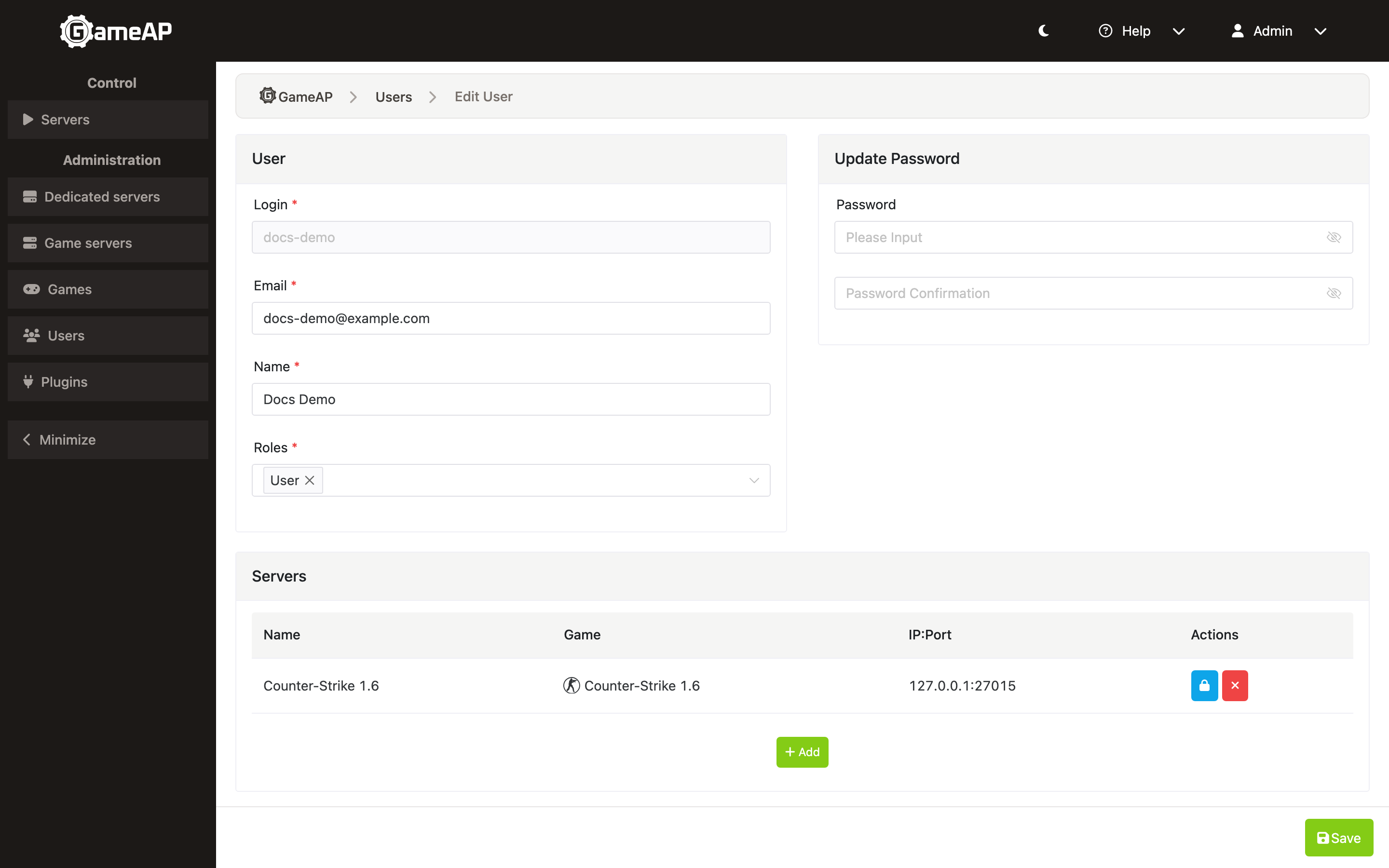
Attaching and detaching servers takes effect immediately; the form does not need to be saved for that:
- Add opens a window with a server search: start typing in the field with the hint “Start typing the server name”, pick the server and press Add once more. The server is attached right away (the “Server attached” notification).
- The remove button in a server row asks “Detach the server from the user?” and detaches the server right away (“Server detached”).
- Permissions on an attached server are edited in the Edit Server Permission window. Unlike attaching and detaching, they are applied only after Save in that window.
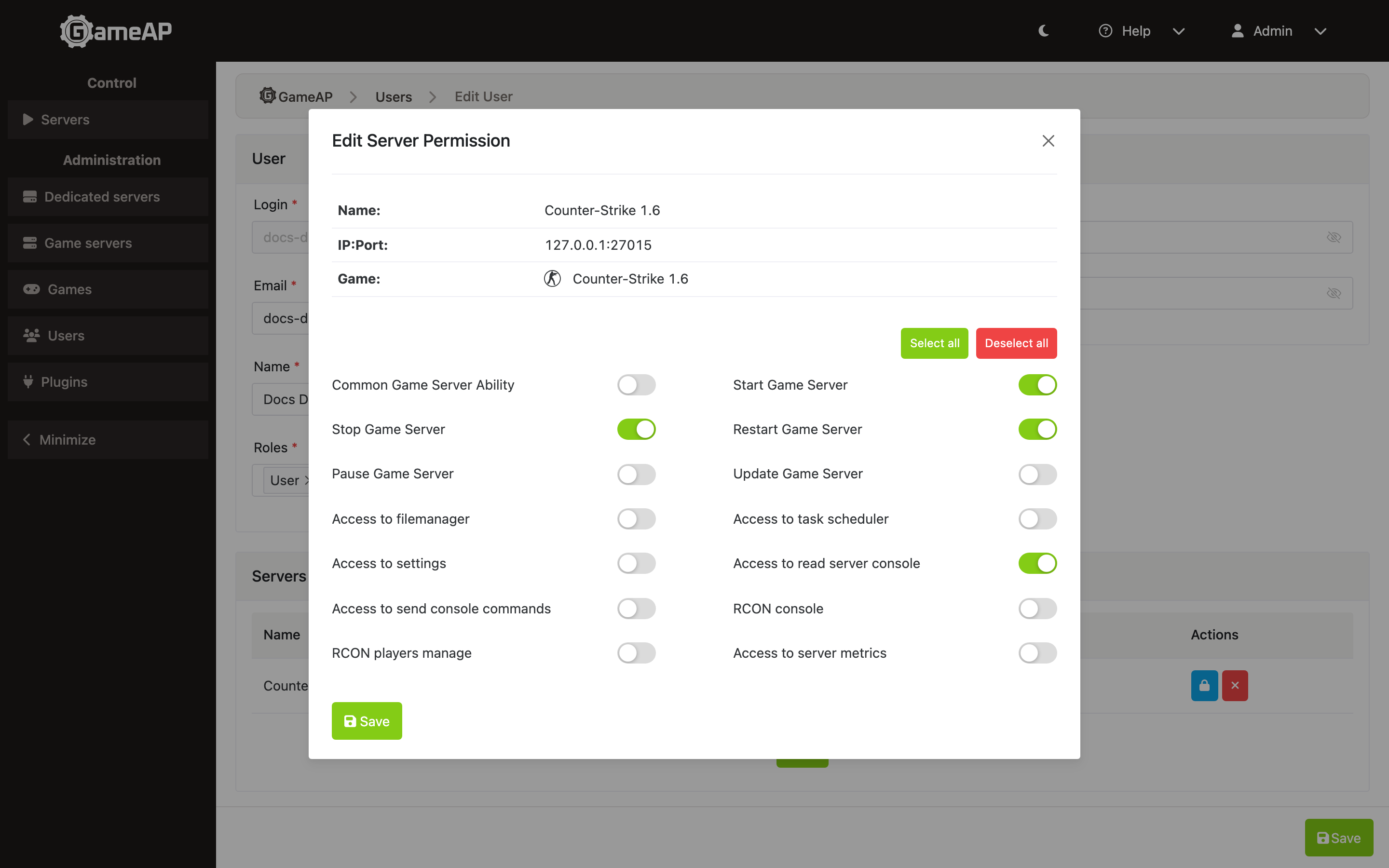
Permissions granted here are tied to the specific server: the user gets access to it and nothing more. Detaching a server does not delete its permissions — they stay on record and take effect again if the server is attached back. To remove them for good, switch them off in Edit Server Permission before detaching.
The same is done via the API:
GET    /api/users/{id}/servers                              — the user's servers
PUT    /api/users/{id}/servers/{server}                     — attach a server
DELETE /api/users/{id}/servers/{server}                     — detach a server
GET    /api/users/{id}/servers/{server}/permissions         — permissions on the server
PUT    /api/users/{id}/servers/{server}/permissions         — change permissions
Attaching and detaching are available to administrators only and return 204 No Content. Both
are idempotent: attaching an already attached server keeps a single record; detaching a server
that is not attached, or that no longer exists, also succeeds — this is how stale assignments are
cleaned up. 404 means the user was not found (for attaching — the server as well).
Your own permissions on a server can be viewed with GET /api/servers/{server}/abilities.
How access is checked
A user’s permissions are collected from two sources: those granted directly and those coming from all of their roles. Then two rules apply.
A denial is stronger than a grant. If there is a deny record for the permission in question, access is not given, no matter how many grants were issued by other paths or in what order they are recorded.
The scope must match. A permission granted for one server has no effect on another. A denial set on one server likewise does not affect the rest.
A permission can be granted in three scopes:
| Scope | Meaning |
|---|---|
| Globally | Applies everywhere |
| On an object type | Applies to all game servers, all dedicated servers, and so on |
| On a specific object | Applies to this server only |
Checks that need global access — the administrator check, for example — count only a globally granted permission. A grant tied to a single server does not make one an administrator.
Revoking a permission in the interface does not always mean simply deleting the record. If after the deletion the user would still receive the permission through a role, the panel additionally sets an explicit denial — otherwise the permission would come back through the role.
Caching
There are two caches, and this matters when permissions are edited directly in the database.
| Layer | Variable | Default | When it applies |
|---|---|---|---|
| In-process | RBAC_CACHE_TTL |
30s |
Always |
| Shared cache | CACHE_TTL_RBAC |
24h |
Only with CACHE_DRIVER=redis |
Permission changes made through the interface and the API flush the cache immediately. Edits made
directly in the database do not flush it: with the in-process cache they take effect within
30 seconds, and with CACHE_DRIVER=redis — within a day. If you edited the database, clear the
cache or restart the panel.
Managing users
| Method and path | Purpose |
|---|---|
GET /api/users |
User list |
POST /api/users |
Create a user |
GET /api/users/{id} |
User details |
PUT /api/users/{id} |
Update a user |
DELETE /api/users/{id} |
Delete a user |
All of these are available to administrators only. When they are called with a personal access
token, the token must carry the matching ability: admin:user:read for reading,
admin:user:manage for creating and updating users, attaching and detaching servers and changing
permissions on a server. Deleting a user has no token ability and is possible from a session only.
Regardless of abilities, a token cannot assign an administrative role, edit an administrator’s
account or server assignments, or change a password — such requests are rejected with 403.
See API.
POST /api/users and PUT /api/users/{id} accept a servers field — an array of game server
IDs. The list is replaced as a whole on every request: omitting the field or sending an empty
array clears all of the user’s server assignments. For incremental changes use
PUT/DELETE /api/users/{id}/servers/{server}.
Logins and e-mail addresses are stored in lowercase whatever casing was entered, and sign-in by
either is case-insensitive. Creating a user whose login or e-mail, once lowercased, already
belongs to another account returns 409. When upgrading to 4.5.0 the migration lowercases the
existing rows; if two accounts collide, only one of them keeps the identifier and the other can no
longer sign in with it — the panel logs a warning with both user IDs, and the administrator has to
give the second account a different login or e-mail.
A user can be attached to a server only once: since 4.5.0 the user/server pair is unique in the database, so repeated attach calls do not create duplicates.
The password set when creating or updating a user goes through the password policy check: no fewer than 12 and no more than 128 bytes and not on the compromised password list. See Security for details.
There is no user self-registration in the panel: accounts are created by an administrator.
Common tasks
Give a user access to a single server
- Create a user: Administration → Users → Create.
- Assign them the
Userrole. - In the Servers block press Add, find the server and attach it.
- Open Edit Server Permission for that server, switch on the permissions and press Save.
The minimal working set:
game-server-common,game-server-start,game-server-stop,game-server-restart. - Add as needed: the file manager, the console, RCON, tasks.
Make a user an administrator
Assign the Administrator role. It contains the admin roles & permissions permission, which
gives full access.
From then on the two-factor authentication requirement applies to the user: on their next login they will see a reminder, and after 30 days — a demand to enable it. See Security.
Revoke access without deleting the account
Detach the server from the user — the remove button in the Servers block or
DELETE /api/users/{id}/servers/{server} — and leave the User role. The permissions on the
server are kept: if the server is attached again later, the previous set applies again. If the
assignment has to stay, switch the permissions off in Edit Server Permission instead.
The user will be able to log in but will no longer see that server; the other servers attached to them stay available. To take access away entirely, detach every server. Active sessions are not terminated by this — they keep working until they expire (24 hours, or 7 days for logins with “remember me” checked).